
Exploring Databricks' Lakehouse Industry Data Models
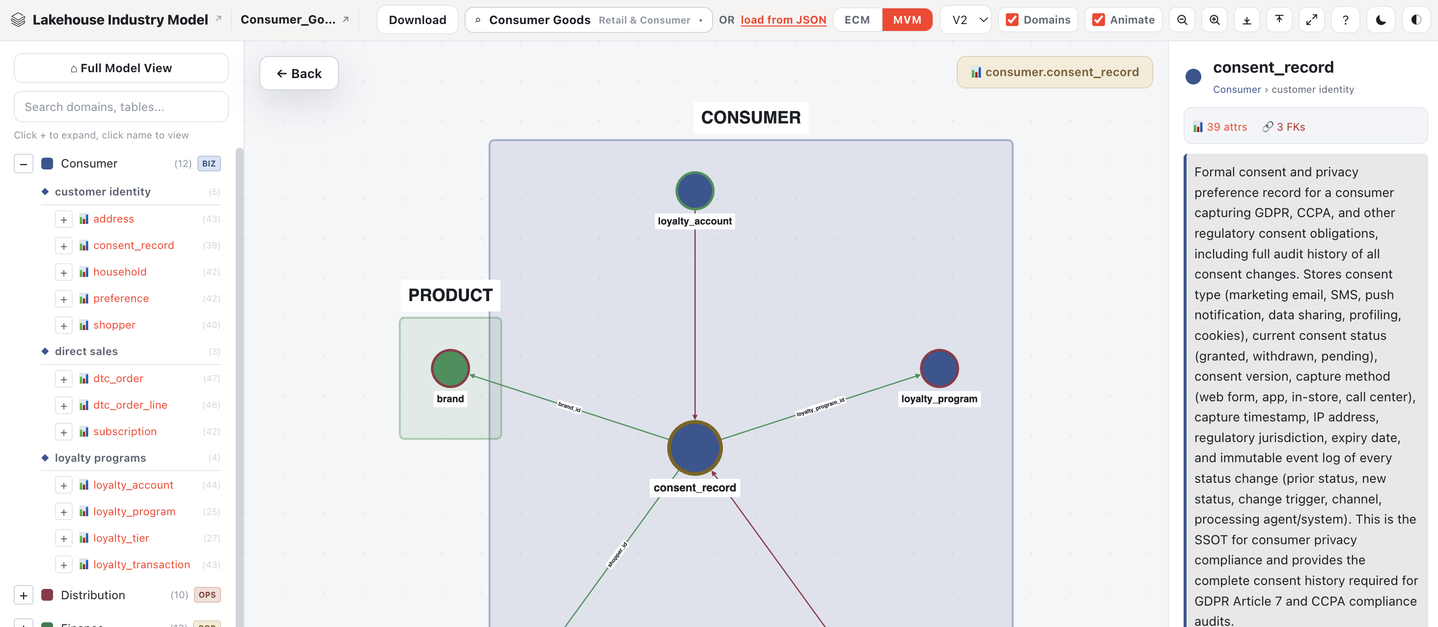
Databricks recently released a browsable catalog of pre-built data model schemas, one for each of 40 industries, that you can inspect for free and then deploy directly into your own Databricks workspace. The header image of this article, with industry=consumer_goods&flavour=mvm in the URL, is the consumer goods industry model in its lighter of two versions.
Here’s what that means in practice, and why it’s worth knowing about.
What’s actually in it
Each of the 40 industries ships in two versions, or “flavours”.
ECM (Expanded Coverage Model) is the full version. Comprehensive, audit-grade, covering operational, financial, and regulatory entities you’d expect a large enterprise to need. Across all 40 industries, the ECM versions add up to tens of thousands of tables and hundreds of thousands of columns.
MVM (Minimum Viable Model) is the lighter version at roughly 40-45% of the ECM’s table count, but it keeps a disproportionate share of the important stuff: around 70% of the foreign key relationships and half the attributes. The idea is that it keeps the high-traffic tables and the join paths that actually get used, and drops the long tail of edge-case entities.
For consumer goods specifically, the ECM runs to around 19 domains and 400+ tables. The MVM cuts that down to roughly 14 domains and under 200 tables.
What you get for either flavour, per industry:
- DDL (Data Definition Language) to create the actual tables and schemas in Databricks Unity Catalog
- Foreign key definitions, so the tables join together correctly out of the box
- Governance tags attached to entities (the kind of classification tagging that shows up in a data catalog)
- Pre-built metric views, meant to be queried directly by a BI tool
- An entity-relationship diagram you can look at before committing to anything
- Optional synthetic sample data, generated at install time, so the tables aren’t empty on day one
Where it came from
All 40 of these models were generated by an internal Databricks tool called Vibe Data Modeling, which Databricks introduced properly in July 2026. The pitch behind it is that building a Silver-layer data model by hand has historically meant one of two bad options: spend 6 to 36 months building your own from scratch, or buy a generic industry-standard template (something like ACORD for insurance, or FHIR for healthcare) and then spend another 9 to 12 months customising it to fit how your business actually works. Databricks’ own framing of the second option is blunt: “a template is the average model for a sector; by construction it is nobody’s actual business”.
Vibe Data Modeling is Databricks’ answer: describe your business in plain English, and an AI agent designs the schema for you. It runs through a multi-stage pipeline, using larger models for the reasoning and design work and smaller specialised models for tagging and sample data generation, with validation checks at each stage to catch structural problems like broken foreign keys or circular references before anything gets deployed.
The 40 industry models in the link above are Databricks running that same agent against 40 different industries and publishing the results as a public reference library on GitHub, partly as documentation, partly as a demonstration of what the tool can do.
How you’d actually use it
If you’re on Databricks, there’s an installer notebook (data-model-installer.ipynb) that takes an industry and a flavour as input, and creates the whole thing directly in your Unity Catalog: the schemas, the tables, the foreign keys, the governance tags, the metric views. You can start from the MVM and expand it into the ECM later, or start from the ECM and shrink it, without rebuilding from zero either way.
The synthetic data comes with a direct warning attached, and it’s worth repeating rather than glossing over: it’s there so the tables aren’t empty while you’re evaluating the schema, not as anything resembling real data. Databricks’ own documentation says not to treat it as ground truth for analytics, and to replace it with real ingestion before anything goes to production.
The part worth thinking about before you touch it
The whole pitch of Vibe Data Modeling is that a generic industry template is nobody’s actual business, and an AI-generated one built from your own description is closer to being yours. That’s a fair criticism of the old approach. But it’s worth being honest about where this new approach actually lands: unless you sat down and fed the agent a detailed description of your specific business, what you’re looking at on that page is still a generic template. The example image used in this article is purely a generic template built by an LLM instead of a standards committee, for a “consumer goods company” in the abstract, not your own company.
That doesn’t make it useless. A well-structured starting schema with sensible foreign keys, proper governance tags, and BI-ready metric views already in place is a genuinely faster starting point than a blank Unity Catalog. It just means the honest way to use it is as a first draft you customise, the same way you’d treat any template, not as a finished data model for your actual business.
There’s also a detail in the deliverables list that’s worth attention: alongside the DBML diagrams and metric views, each model ships with an RDFS ontology, described as being there for AI agents to use. That’s a live example of something we talk about a lot: a schema built with an AI agent as a consumer of the data, not just a BI dashboard. Whether or not you ever touch Databricks, it’s a useful preview of what “AI-ready” is starting to mean at the schema level: governance tags an agent can read, an ontology describing what things mean, not just what they’re called, and metric views defined once so an agent and a human analyst get the same number.
What to actually check if you’re evaluating it
If you’re a brand or an agency working with one and curious whether this saves real time: look at the MVM’s domain list against your own actual reporting needs first. If a domain you rely on constantly (trade spend, retail execution, whatever it is for your business) isn’t well represented, the model needs real customisation before it’s useful, not just a deploy-and-go. And treat the synthetic data exactly as labelled: fine for kicking the tyres on the schema, not something to build a real report from.
Newsletter
Occasional notes on data, tracking & AI-readiness
No spam, no growth-hacking. Just an email when there's something worth reading.