
Layer Lens v1.2 — Email Privacy Detection
Update to Chrome extension to allow users to easily search for if their email address is being set in the data layer or sent to Google.

Layer Lens can be found in the Chrome Web Store here.
The Problem
Email addresses move through analytics stacks in more places than most people realise. Google Enhanced Conversions, the Meta Conversions API, and GA4 user_data all accept email as a matching or enrichment signal — but almost universally require it to arrive as a SHA-256 hash rather than plain text. Sending plain-text email is both a privacy risk and a practical problem: Google’s Enhanced Conversions, for example, expects a normalised and hashed value, so an unhashed email either gets rejected or degrades match quality silently.
Verifying this previously meant manually computing SHA-256 hashes of your email using an external tool, then searching the DevTools Network tab by hand for each variant. The feature idea came from using Layer Lens itself — searching for a value on a page and realising that if I typed an email address, it might appear somewhere in the tracking layer, and I’d have no easy way to know.
What Was Built
v1.2 adds a dedicated Email tab to the Layer Lens popup alongside the original Events search tab.
Entering an email address and clicking Check triggers two parallel searches across both the dataLayer and captured GA4 network hits:
Plain-text search: Searches for the email address exactly as entered. Any match surfaces under a “Plain text — email exposed” heading — an unambiguous signal that PII is present in the tracking layer without hashing.
SHA-256 search: Rather than requiring the user to hash the email themselves, the extension computes SHA-256 hashes in-browser using the native Web Crypto API (crypto.subtle.digest) — no external requests, no data leaving the browser. Three casing variants are computed and deduplicated: the original, fully lowercased, and fully uppercased. This covers the different normalisation approaches used across platforms — Google normalises to lowercase before hashing, while other platforms may not. Each unique hash is searched independently. Matches appear under a “SHA-256 hash found” heading.
If neither search finds anything, the result is a clean confirmation that the email is absent from the current tracking data in any form.
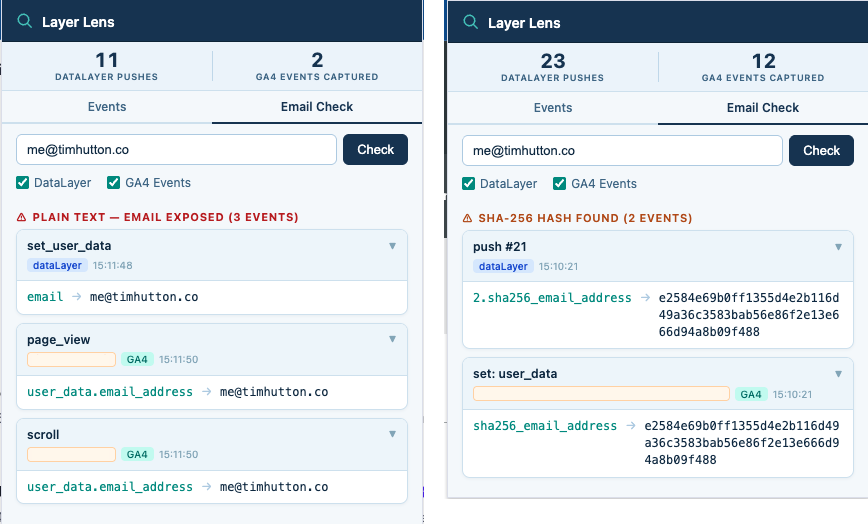
Not Just for Analytics Teams
The email check is just as useful for anyone curious about their own data. If you have signed into a website, checked out as a customer, or submitted a form and want to know whether your email address is being passed to third-party analytics or advertising platforms — and if so, in what form — you can now find out in seconds. Open Layer Lens, switch to the Email tab, type your address, and you will immediately see whether it appears in the tracking data, whether it is in plain text, or whether it has been hashed before being sent on. Most people have no way of knowing this is even happening; Layer Lens makes it visible. Potentially this feature will be spun out into its own extension in future.
gtag user_data Capture
v1.2 also added capture of gtag('set', 'user_data', {...}) calls in injected.js. This is the primary pathway GA4 Enhanced Conversions uses to receive PII — email, phone number, postal address — for conversion matching. These calls were previously invisible to Layer Lens; they now appear in both the Events search and the Email tab results.
Smart Email Detection in the Tooltip
The existing hover-to-search tooltip (which shows a “Search with Layer Lens” button when you highlight text on a page) was updated to recognise email address patterns. Selecting text that matches an email format opens the popup directly on the Email tab with the check pre-run, while also silently pre-filling the Events tab. The last-searched email address is persisted in chrome.storage.local so it is available on the next popup open.
Tech Stack
- Vanilla JavaScript (ES2020) — no build step, no frameworks, no dependencies
- Web Crypto API (
crypto.subtle.digest) for in-browser SHA-256 hashing - Chrome Extension Manifest V3
chrome.storage.localfor persisting the last-searched email- Two-world content script architecture (MAIN + ISOLATED worlds)