
Layer Lens — Chrome Extension
Chrome extension built to make analytics debugging easy.
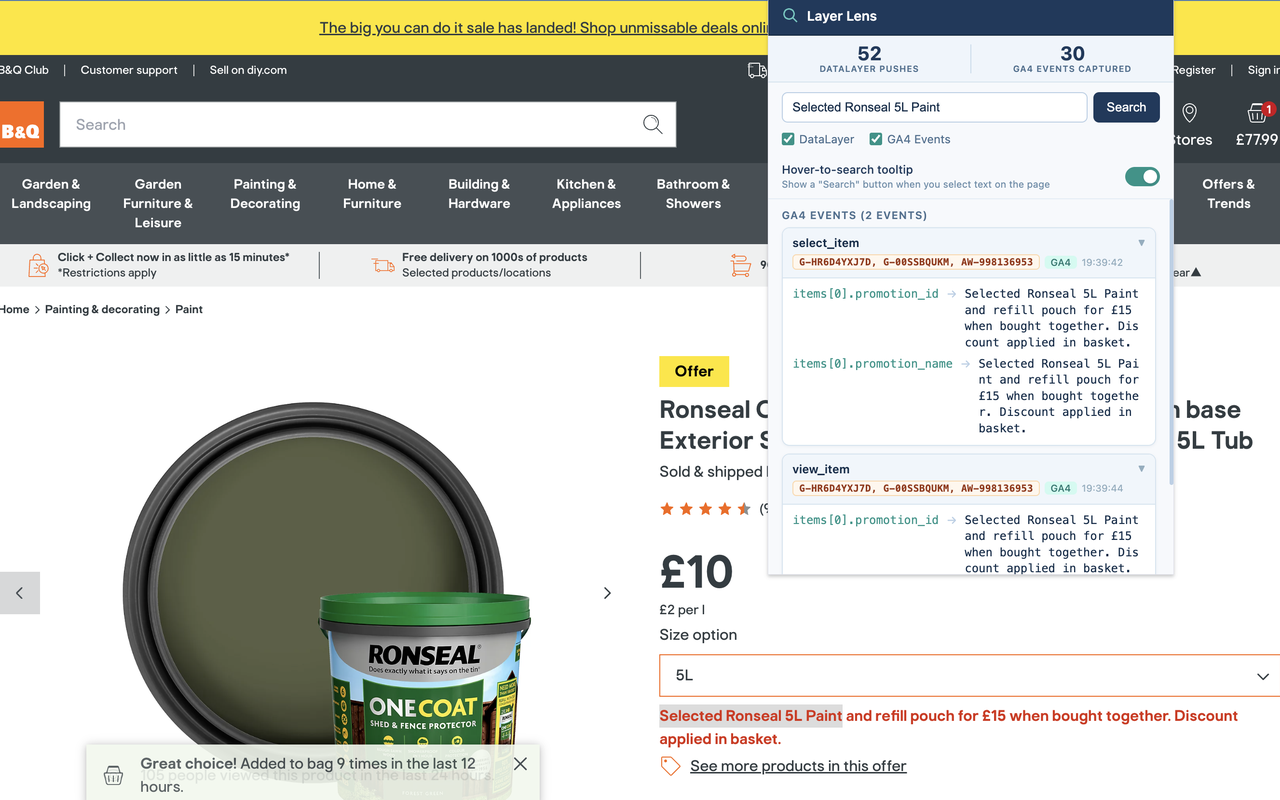
Layer Lens is a Chrome extension for searching GTM dataLayer pushes and GA4 network hits on any website in real time. Type any value — a product ID, event name, user property, EAN — and it finds exactly where that value appears in the tracking layer and Google Analytics requests, showing the parameter path and matched value in a clean popup UI.
The extension code can be found on Github here.
The Problem
Analytics implementations can be hard to verify quickly - especially if all you want to do is understand where you can find a particular value. When a new data point is added, the standard approach is to open DevTools, go to the Network tab, filter by collect, and manually inspect individual requests. For GA4, this means decoding compact tilde-delimited item strings like pr1=id46376 by hand - an arduous task at the best of times.nmJacketbrVERSACEcaClothingpr5530~qt1
The problem is not that the information is unavailable — it is that the workflow is slow, error-prone, and does not match the way people actually think about tracking. An analyst verifying a product page fires the right data has a specific value in mind (usually something visible on the page) and wants to know: is this value in the data? The DevTools workflow forces them to work the other way around — browse all the data and search for the value manually.
Layer Lens inverts that: search first, starting from the value you can see on the page.

How It Works
The extension is built entirely in vanilla JavaScript with no external dependencies, as a Manifest V3 Chrome extension.
The core challenge in building a dataLayer/GA4 inspector is that Chrome extensions run in an isolated JavaScript world that cannot access a page’s own window object. Intercepting dataLayer.push() requires code running in the MAIN world — the same execution context as the page itself. Layer Lens solves this with a two-script architecture:
-
injected.js(MAIN world) — runs atdocument_start, before any page scripts execute. It wraps five APIs:window.dataLayer.push,window.gtag(),window.fetch,XMLHttpRequest.send, andnavigator.sendBeacon. All captured events are stored in memory arrays inside the page tab. Because it runs at document start, it also handles SPAs that resetwindow.dataLayermid-session by intercepting future property assignments viaObject.defineProperty. -
content.js(ISOLATED world) — bridges the gap between the popup andinjected.js. Because the two worlds share a DOM but not JavaScript variables, they communicate viaCustomEventdispatched onwindow.content.jsalso renders the in-page hover-to-search tooltip and listens tochrome.storage.onChangedto respond to the user toggling the tooltip preference in the popup.
When the user searches, the message flow is: popup → chrome.tabs.sendMessage → content.js → CustomEvent → injected.js → recursive value search → CustomEvent response → content.js → popup render.
The search itself is a recursive depth-first walk of each captured event object, returning an array of { path, value } descriptors for every leaf whose string representation contains the search term (case-insensitive). Paths are expressed in dot/bracket notation (e.g. ecommerce.items[0].item_id) so the result is immediately actionable.
GA4 Ecommerce Decoding
GA4 sends ecommerce item data in a compact network format to reduce payload size. There are two variants: a legacy dotted format (pr1.nm=Jacket) and a modern tilde-delimited format (pr1=id46376). Both use two-character short codes that map to GA4 field names.nmJacketbrVERSACE
Layer Lens decodes both formats automatically using a short-code lookup table and a custom parser for the tilde-delimited segments, including support for custom parameters serialised as k0<name>~v0<value> pairs. The result is that all item fields appear in search results under their full GA4 names (item_name, item_brand, item_category, etc.) without any manual cross-referencing.
Server-Side GTM Detection
Standard GA4 hits go to google-analytics.com/g/collect. However, many sites proxy GA4 hits through a first-party domain via server-side GTM for privacy compliance and improved hit delivery. These hits look identical at the network level but arrive at a domain like analytics.net-a-porter.com/g/collect or t.example.com/g/collect.
Layer Lens uses a three-tier detection strategy: first match by Google’s own domain, then by the /g/collect path on any domain, then by GA4 payload fingerprint (tid=G- combined with en=). This means it catches GA4 hits reliably regardless of where the tagging server is hosted.
Permissions
The extension requests only what it needs: activeTab and scripting for tab communication, contextMenus for the right-click search, storage to persist the last search and tooltip preference, and <all_urls> host permission to inject content scripts across all pages. No data is ever sent externally — all captured events live only in the tab’s memory.
Version 2 — Email Privacy Detection
v1.2 added a dedicated Email tab to the popup for checking whether an email address appears in the tracking data as plain text or as a SHA-256 hash — covering the normalisation variants used by platforms like Google Enhanced Conversions and the Meta Conversions API. Full details on the v1.2 feature can be found in the Layer Lens v1.2 portfolio entry.
Tech Stack
- Vanilla JavaScript (ES2020) — no build step, no frameworks, no dependencies
- Chrome Extension Manifest V3
- Two-world content script architecture (MAIN + ISOLATED)
- Web Crypto API (
crypto.subtle.digest) for in-browser SHA-256 hashing chrome.storage.localfor persistent preferenceschrome.action.openPopup()for programmatic popup triggering (requires Chrome 99+)- HTML/CSS popup UI with collapsible result cards